What's new in Aspire 13.1
Aspire 13.1 builds on the multi-language foundation established in Aspire 13, delivering significant improvements to the CLI experience, enhanced MCP (Model Context Protocol) support for AI coding agents, dashboard refinements, and streamlined Azure deployments. This release focuses on developer productivity and seamless integration with modern AI-assisted development workflows.
This release introduces:
- MCP for AI Coding Agents: New
aspire agent initcommand and MCP tools for AI assistants to discover integrations and interact with your Aspire applications. - CLI enhancements: Channel persistence, automatic instance detection, and installation path options.
- Dashboard improvements: Dedicated Parameters tab and GenAI visualizer enhancements.
- Azure Managed Redis: Renamed from
AddAzureRedisEnterprisetoAddAzureManagedRediswith improved validation. - Container registry support: New
ContainerRegistryResourcefor general-purpose container registries. - JavaScript improvements: New frontend starter template, Vite HTTPS configuration, and pnpm fixes.
- DevTunnels stabilization: 📦 Aspire.Hosting.DevTunnels is now a stable package.
- TLS termination support: New APIs for configuring HTTPS certificates on containers and resources.
- Connection properties for Azure resources: Multi-language support for Azure resource connection strings.
Requirements:
If you have feedback, questions, or want to contribute to Aspire, collaborate with us on GitHub or join us on our Discord to chat with the team and other community members.
🆙 Upgrade to Aspire 13.1
Caution
Aspire 13.1 includes breaking changes to Azure Redis APIs. Please review the Breaking changes section before upgrading.
Note
If you are on a version of the Aspire CLI less than 13, please use the installation instructions to install the latest stable version.
The easiest way to upgrade to Aspire 13.1 is using the aspire update command:
Update your Aspire project using the
aspire updatecommand:aspire updateUpdate the Aspire CLI itself:
aspire update --self
Note
When you run aspire update --self and select a channel, your selection is now saved globally. Future aspire new and aspire init commands will use this channel by default.
🤖 MCP for AI Coding Agents
Aspire 13.1 introduces comprehensive support for AI coding agents through MCP (Model Context Protocol) integration. Configure your favorite AI coding tools to understand and interact with your Aspire applications.
Initialize MCP for your project
The new aspire agent init command detects your development environment and configures MCP servers for supported AI coding agents:
aspire agent init
The command presents a streamlined two-step selection process:
Which agent environments do you want to configure?
[ ] Configure VS Code to use the Aspire MCP server
[ ] Configure GitHub Copilot CLI to use Aspire MCP server
[ ] Configure Claude Code to use Aspire MCP server
[ ] Configure Open Code to use Aspire MCP server

Which additional options do you want to enable?
[ ] Create an agent instructions file (AGENTS.md)
[ ] Configure Playwright MCP server
MCP tools for AI agents
AI coding agents connected via MCP can now discover and use Aspire integrations directly:
list_integrations— Returns available Aspire hosting integrations (Redis, PostgreSQL, Azure services, etc.).get_integration_docs— Retrieves detailed documentation for a specific integration package.list_apphosts— Lists all detected AppHost projects in the workspace.select_apphost— Switches context to a specific AppHost when multiple exist.
Dashboard MCP integration
When connected to an AppHost, the dashboard exposes MCP endpoints, enabling AI agents to query resource state, view logs, and inspect traces directly from your running application.
🛠️ CLI enhancements
Channel selection and persistence
The --channel option is now available on aspire new and aspire init commands, letting you explicitly choose which Aspire version channel to use:
aspire new aspire-starter --channel preview
aspire init --channel stable
When you update the CLI with aspire update --self, your channel selection is persisted to ~/.aspire/globalsettings.json and becomes the default for future project creation.
Automatic instance detection
Running aspire run when an instance is already running? Aspire 13.1 automatically detects running instances and terminates them.
Installation path option
The installation scripts now support --skip-path to install the CLI without modifying your PATH:
📊 Dashboard improvements
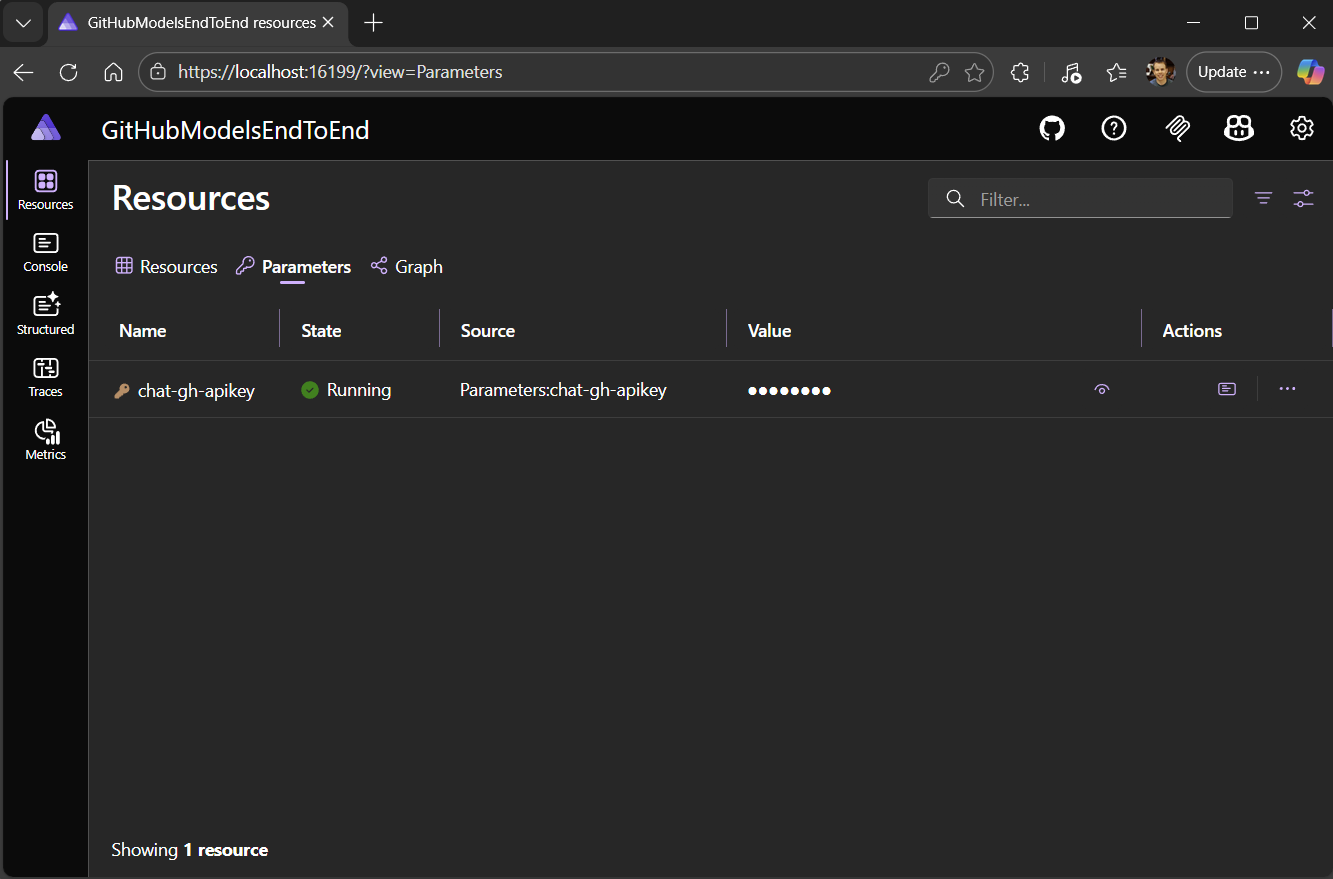
Dedicated Parameters tab
The Resources page now includes a dedicated Parameters tab, making it easier to view and manage configuration parameters for your resources without navigating away from the resource details.
GenAI visualizer enhancements
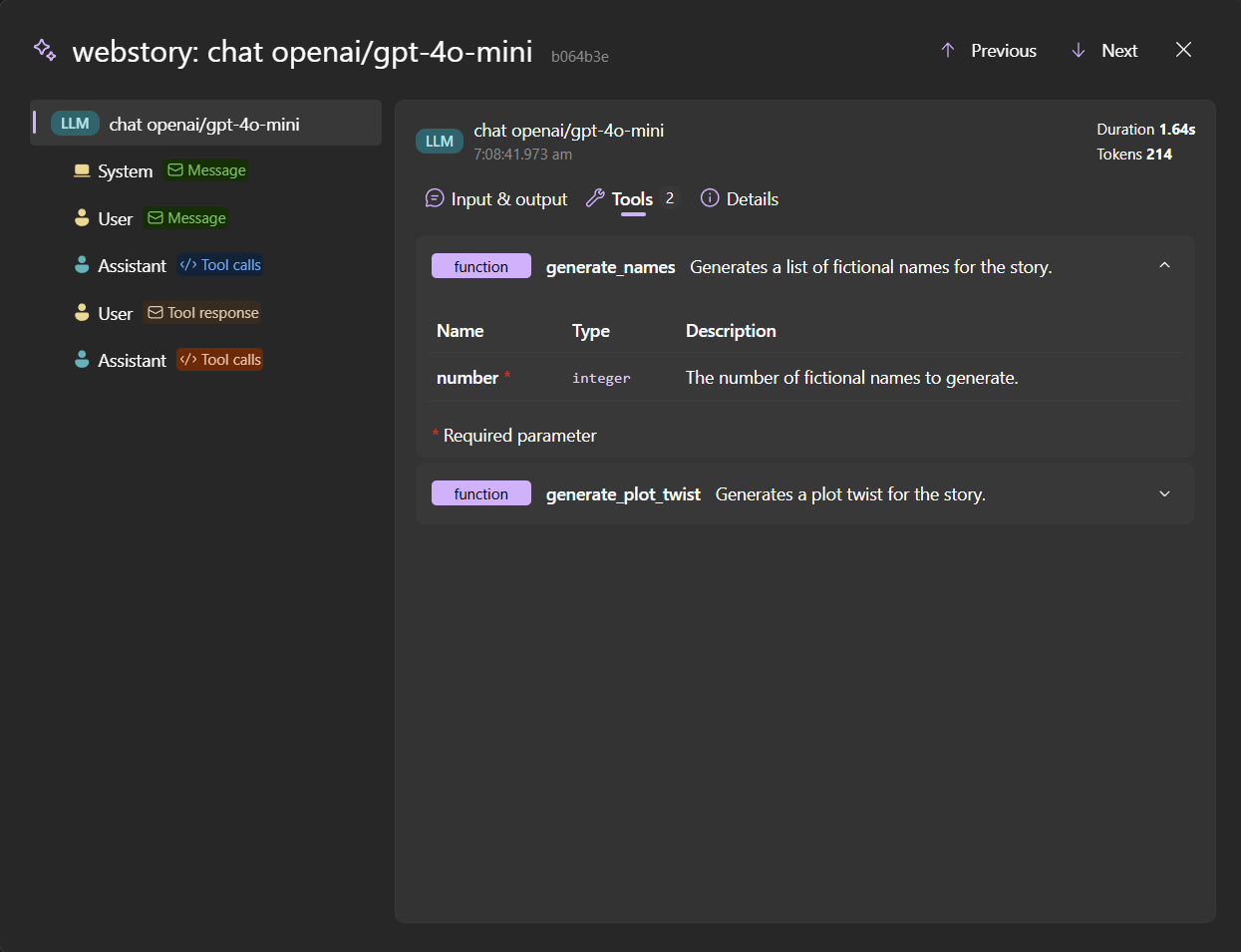
The GenAI visualizer received several improvements:
- Tool definitions & evaluations — Tool definitions and evaluations associated with GenAI spans are displayed in the visualizer.
- Video and audio preview — Video and audio content can be previewed in the GenAI visualizer.
- Linked log entries — Log entries associated with GenAI spans now include a direct link to the GenAI visualizer.
- Improved content parsing — Better handling of various AI model response formats.
Bug fixes
- Fixed
OverflowExceptionin the Traces page when trace duration exceedsint.MaxValue. - Fixed combobox filter behavior when no items match the search criteria.
- Fixed view options menu visibility when hidden resources exist.
☁️ Azure improvements
Azure Managed Redis
Caution
Breaking Change: The AddAzureRedisEnterprise method has been renamed to AddAzureManagedRedis to better reflect the Azure service naming.
// Before (Aspire 13.0)
var redis = builder.AddAzureRedisEnterprise("cache");
// After (Aspire 13.1)
var redis = builder.AddAzureManagedRedis("cache");Note
AddAzureRedis is now obsolete. Migrate to AddAzureManagedRedis for new projects.
Connection properties for Azure resources
Azure resources now expose connection properties in a standardized format that works across all supported languages. This enables multi-language applications using Java, JavaScript, and Python SDKs to connect to Azure resources using consistent configuration patterns.
Resources now expose additional properties such as HostName, Port, and JdbcConnectionString where applicable, making it easier to configure clients in languages that don't use .NET connection string formats.
Azure App Service deployment slots
New WithDeploymentSlot extension method to configure deployment slots for Azure App Service:
var builder = DistributedApplication.CreateBuilder(args);

builder.AddAzureAppServiceEnvironment("appservice")
    .WithDeploymentSlot("staging");
Clear default role assignments
New ClearDefaultRoleAssignments extension method to disable automatic role assignments on Azure resources when you need fine-grained control over permissions.
Bug fixes
- Azure deployments now validate that required compute environments exist before attempting deployment, providing earlier and clearer error messages when infrastructure is missing.
- Fixed an issue with Azure authentication when working across multiple tenants.
🐳 Container and Docker Compose
Container registry resource
Caution
This API is experimental and may change in future releases. Use diagnostic code ASPIRECOMPUTE003 to suppress the experimental warning. For more information, see ASPIRECOMPUTE003.
A new ContainerRegistryResource enables integration with general-purpose container registries beyond Azure Container Registry:
var builder = DistributedApplication.CreateBuilder(args);

var registry = builder.AddContainerRegistry("myregistry", "registry.example.com");

var api = builder.AddProject<Projects.Api>("api")
    .WithContainerRegistry(registry);
The deployment pipeline now includes a push step for container registry operations.
$ aspire do push
16:03:38 (pipeline-execution) → Starting pipeline-execution...
16:03:38 (push-prereq) → Starting push-prereq...
16:03:38 (process-parameters) → Starting process-parameters...
16:03:38 (push-prereq) ✓ push-prereq completed successfully
16:03:38 (process-parameters) i [INF] 3 parameter values saved to deployment state.
16:03:38 (process-parameters) ✓ process-parameters completed successfully
16:03:38 (build-prereq) → Starting build-prereq...
16:03:38 (build-prereq) ✓ build-prereq completed successfully
16:03:38 (build-go-app) → Starting build-go-app...
16:03:38 (build-pythonapp-standalone) → Starting build-pythonapp-standalone...
16:03:38 (build-api) → Starting build-api...
16:03:38 (build-viteapp) → Starting build-viteapp...
...
16:03:43 (push-api) → Starting push-api...
16:03:43 (push-api) → Pushing api to container-registry
16:03:44 (push-api) i [INF] Docker tag for api -> docker.io/captainsafia/api:latest succeeded.
16:03:44 (push-pythonapp) i [INF] Docker tag for pythonapp:d5325602e04758397792c8332c5882846516b35c -> docker.io/captainsafia/pythonapp:latest succeeded.
16:03:48 (push-go-app) i [INF] Docker push for docker.io/captainsafia/go-app:latest succeeded.
16:03:48 (push-go-app) ✓ Successfully pushed go-app to docker.io/captainsafia/go-app:latest (5.1s)
16:03:48 (push-go-app) ✓ push-go-app completed successfully
16:03:48 (push-pythonapp-standalone) i [INF] Docker push for docker.io/captainsafia/pythonapp-standalone:latest succeeded.
16:03:48 (push-pythonapp-standalone) ✓ Successfully pushed pythonapp-standalone to docker.io/captainsafia/pythonapp-standalone:latest (5.4s)
16:03:48 (push-pythonapp-standalone) ✓ push-pythonapp-standalone completed successfully
16:03:49 (push-pythonapp) i [INF] Docker push for docker.io/captainsafia/pythonapp:latest succeeded.
16:03:49 (push-pythonapp) ✓ Successfully pushed pythonapp to docker.io/captainsafia/pythonapp:latest (5.7s)
16:03:49 (push-pythonapp) ✓ push-pythonapp completed successfully
16:04:05 (push-api) i [INF] Docker push for docker.io/captainsafia/api:latest succeeded.
16:04:05 (push-api) ✓ Successfully pushed api to docker.io/captainsafia/api:latest (21.3s)
16:04:05 (push-api) ✓ push-api completed successfully
16:04:05 (push) → Starting push...
16:04:05 (push) ✓ push completed successfully
16:04:05 (pipeline-execution) ✓ Completed successfully
------------------------------------------------------------
✓ 14/14 steps succeeded • Total time: 26.41s
Explicit container registry support for Azure deployments
Prior to Aspire 13.1, when deploying to Azure Container Apps using AddAzureContainerAppEnvironment, the Azure Container Registry (ACR) was provisioned implicitly as part of the environment. This automatic provisioning could cause deployment delays and made it difficult for developers to discover which registry was being used.
Aspire 13.1 addresses this by moving toward explicit container registry configuration, giving developers more control and visibility into where and when images are pushed. With the configuration below, the ACR associated with the "myenv" environment will be provisioned in parallel with the environment and image pushes will begin as soon as the registry has been successfully provisioned.
var builder = DistributedApplication.CreateBuilder(args);

var acr = builder.AddAzureContainerAppEnvironment("myenv");

var api = builder.AddProject<Projects.Api>("api")
    .WithContainerRegistry(acr);
Docker Compose improvements
- Bind mount sources are now replaced with environment placeholders for portability.
- Resource endpoints are displayed after Docker Compose deployment.
- Fixed race condition in Dockerfile materialization during parallel pipeline execution.
For advanced scenarios, use ConfigureEnvFile to customize the generated .env file:
var builder = DistributedApplication.CreateBuilder(args);

builder.AddDockerComposeEnvironment("compose")
    .ConfigureEnvFile(env =>
    {
        env["CUSTOM_VAR"] = new CapturedEnvironmentVariable
        {
            Name = "CUSTOM_VAR",
            DefaultValue = "my-value"
        };
    });
🌐 JavaScript and frontend support
JavaScript frontend starter template
A new aspire-ts-cs-starter template provides a ready-to-use JavaScript frontend setup:
aspire new aspire-ts-cs-starter
The template includes:
- An ASP.NET Core minimal API backend named
Server. - A Vite-backed React client named
frontend. - An AppHost project to orchestrate both.
Note
The template uses npm by default. You can switch to yarn or pnpm after project creation.
Vite HTTPS configuration
Aspire now supports dynamically augmenting existing Vite configurations to enable HTTPS endpoints at runtime, eliminating manual certificate configuration for development.
Bug fixes
- Fixed Dockerfile generation for projects using
pnpmby properly enabling corepack. If you're unfamiliar with corepack, see the corepack documentation, and it works well withpnpm.
🔒 Certificates and security
Configuring and trusting local development certificates is now more straightforward with Aspire 13.1. For more details, see Certificate configuation.
TLS termination support
Caution
These APIs are experimental and may change in future releases. Use diagnostic code ASPIRECERTIFICATES001 to suppress the experimental warning. The diagnostic warning is detailed in ASPIRECERTIFICATES001.
New APIs allow configuring HTTPS certificates for resources that need to terminate TLS connections.
The following containers have built-in TLS termination support:
| Container | Default |
|---|---|
| YARP | Enabled |
| Redis | Enabled |
| Keycloak | Enabled |
| Uvicorn (Python) | Enabled |
| Vite (JavaScript) | Opt-in |
When TLS is enabled by default, the ASP.NET Core developer certificate is automatically used if available and trusted.
To explicitly enable the developer certificate on a resource (e.g., for Vite):
var builder = DistributedApplication.CreateBuilder(args);

builder.AddViteApp("frontend")
    .WithHttpsDeveloperCertificate();
To use a custom certificate:
var certificate = new X509Certificate2("path/to/certificate.pfx", "password");

builder.AddYarp("gateway")
    .WithHttpsCertificate(certificate);
For YARP, you can also explicitly set the HTTPS port:
var builder = DistributedApplication.CreateBuilder(args);

builder.AddYarp("gateway")
    .WithHostHttpsPort(8443);
To disable HTTPS certificate configuration for a resource:
var builder = DistributedApplication.CreateBuilder(args);

builder.AddRedis("cache")
    .WithoutHttpsCertificate();
To configure TLS termination for a resource without built-in support, you can use a configuration callback to pass custom arguments and environment variables:
var builder = DistributedApplication.CreateBuilder(args);

builder.AddContainer("my-service", "my-image")
    .WithHttpsCertificateConfiguration(ctx =>
    {
        // Pass the path to the cert in PFX format as an argument
        ctx.Arguments.Add("--https-certificate-path");
        ctx.Arguments.Add(ctx.PfxPath);

        // Set the public and private PEM format certificate paths as environment variables
        ctx.EnvironmentVariables["HTTPS_CERT"] = ctx.CertificatePath;
        ctx.EnvironmentVariables["HTTPS_CERT_KEY"] = ctx.KeyPath;

        return Task.CompletedTask;
    });
🧩 App model updates
Endpoint reference resolution
Endpoint references now properly wait for endpoint allocation when evaluating, fixing race conditions in complex orchestration scenarios.
Container network context
Endpoint references now correctly honor their specific network context when resolving, ensuring proper networking in multi-network container deployments.
System log formatting
System-level logs from DCP now use a human-friendly format with a [sys] prefix instead of verbose JSON objects:
[sys] Starting process: Cmd = dotnet, Args = [run]
[sys] Failed to start Container: Error = container start failed (exit code 1)
This makes it easier to distinguish system logs from application output and improves readability in the console.
📦 Integration updates
DevTunnels stabilization
The 📦 Aspire.Hosting.DevTunnels package is now stable and no longer in preview. Use dev tunnels to expose your local Aspire applications to the internet for testing webhooks, mobile apps, and external integrations.
Endpoint proxy support stabilization
The WithEndpointProxySupport API is now stable and no longer requires the experimental attribute.
Keycloak improvements
Keycloak containers can now export telemetry to your OTLP collector:
var builder = DistributedApplication.CreateBuilder(args);

builder.AddKeycloak("keycloak")
    .WithOtlpExporter();
OpenTelemetry updates
OpenTelemetry dependencies have been updated to the latest stable versions across the codebase.
Azure Functions
In Aspire 13.1, the Azure Functions integration is officially out of preview. Azure Functions now support a local development story with Aspire and deployments to ACA Native Functions with support for KEDA-based auto-scaling rules.
- Aspire dashboard will notify if the Azure Functions Core Tools are not installed on the local machine.
- New overload
AddAzureFunctionsProject(name, projectPath)for adding Functions projects without a generic type parameter:
var builder = DistributedApplication.CreateBuilder(args);

builder.AddAzureFunctionsProject("myfunc", "../MyFunctions/MyFunctions.csproj");
🏗️ Templates
All Aspire templates have been updated for 13.1 with consistent patterns:
- Dropped support for previous Aspire versions.
- Unified project structure across starter templates.
Note
Template changes may require updating existing projects created from older templates.
🐛 Bug fixes
- Fixed
aspire agent inithanging in VS Code terminal on Windows. - Fixed path normalization for AppHost paths on Windows.
- Fixed CLI tool detection on Windows with proper PATHEXT handling.
- Fixed saving parameters with custom config keys.
- Fixed container image builds for resources with dashes in names.
- Fixed relative endpoint URL handling.
- Fixed deployment state file case sensitivity on Linux.
🙏 Community contributions
Thank you to all community contributors who helped make Aspire 13.1 possible:
- Improved resource graph layout with adaptive force-directed positioning.
- Updated npm dependencies across playground apps.
- Documentation link updates.
- Various bug fixes and improvements.
We're always excited to see community contributions! If you'd like to get involved, check out our contributing guide.
⚠️ Breaking changes
Azure Redis API rename
| Change | Migration |
|---|---|
AddAzureRedisEnterprise renamed |
Use AddAzureManagedRedis |
AddAzureRedis obsolete |
Migrate to AddAzureManagedRedis for new projects |
Migration from Aspire 13.0 to 13.1
- 1
Update the CLI: Run
aspire update --self. - 2
Update your projects: Run
aspire updatein your project directory. - 3
Rename Azure Redis: Replace
AddAzureRedisEnterprisewithAddAzureManagedRedis. - 4
Review MCP configuration: Run
aspire agent initto set up AI coding agent support.
Connection Properties rename
Some connection properties have been renamed for consistency across resources:
| Resource | Old property | New property |
|---|---|---|
| GitHub Models resource | Model | ModelName |
| OpenAI model resource | Model | ModelName |
| Milvus database resource | Database | DatabaseName |
| MongoDB database resource | Database | DatabaseName |
| MySQL database resource | Database | DatabaseName |
| Oracle database resource | Database | DatabaseName |
If your client apps where using some of these properties, please update them to use the new names.
For instance for a GitHub Models resource named chat the model name environment variable would change from CHAT_MODEL to CHAT_MODELNAME.
Feedback and contributions: We'd love to hear about your experience with Aspire 13.1! Share feedback on GitHub or join the conversation on Discord.