Persistent container lifetimes
In Aspire, containers follow a typical lifecycle where they're created when the AppHost starts and destroyed when it stops. However, you can specify that you want to use persistent containers, which deviate from this standard lifecycle. Persistent containers are created and started by the Aspire orchestrator but aren't destroyed when the AppHost stops, allowing them to persist between runs.
This feature is particularly beneficial for containers that have long startup times, such as databases, as it eliminates the need to wait for these services to initialize on every AppHost restart.
[!CAUTION] Persistent container ≠ persistent data
ContainerLifetime.Persistentkeeps the container alive between AppHost runs, but it does not guarantee data durability. If the container is ever recreated—due to a configuration change,docker system prune, or an image update—any data stored inside the container filesystem is lost. To ensure data survives container recreation, also useWithDataVolume(). For more information, see Persist data using volumes.
Configure a persistent container
To configure a container resource with a persistent lifetime, use the WithLifetime method and pass ContainerLifetime.Persistent:
C#
var builder = DistributedApplication.CreateBuilder(args);

var postgres = builder.AddPostgres("postgres")
    .WithLifetime(ContainerLifetime.Persistent)
    .WithDataVolume();

var db = postgres.AddDatabase("inventorydb");

builder.AddProject<Projects.InventoryService>("inventory")
       .WithReference(db);

builder.Build().Run();
TypeScript
const builder = await createBuilder();

const postgres = await builder.addPostgres("postgres")
    .withLifetime(ContainerLifetime.Persistent)
    .withDataVolume();

const db = postgres.addDatabase("inventorydb");

await builder.addProject("inventory", "./InventoryService/InventoryService.csproj", "https")
    .withReference(db);

await builder.build().run();
In the preceding example, the PostgreSQL container is configured to persist between AppHost runs, and WithDataVolume() ensures database data is stored in a named volume that survives container recreation. The inventory project references the database as normal.
Dashboard visualization
The Aspire dashboard shows persistent containers with a distinctive pin icon (📌) to help you identify them:
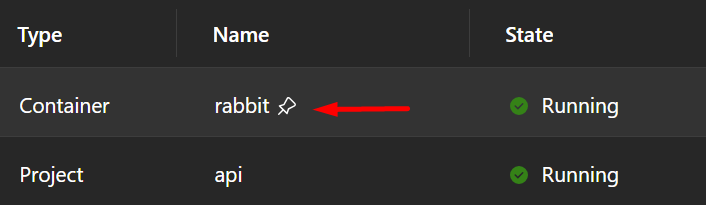
After the AppHost stops, persistent containers continue running and can be seen in your container runtime (such as Docker Desktop):

Configuration change detection
Persistent containers are automatically recreated when the AppHost detects meaningful configuration changes. Aspire tracks a hash of the configuration used to create each container and compares it to the current configuration on subsequent runs. If the configuration differs, the container is recreated with the new settings.
This mechanism ensures that persistent containers stay synchronized with your AppHost configuration without requiring manual intervention.
Container naming and uniqueness
By default, persistent containers use a naming pattern that combines:
- The service name you specify in your AppHost.
- A postfix based on a hash of the AppHost project path.
This naming scheme ensures that persistent containers are unique to each AppHost project, preventing conflicts when multiple Aspire projects use the same service names.
For example, if you have a service named "postgres" in an AppHost project located at /path/to/MyApp.AppHost, the container name might be postgres-abc123def where abc123def is derived from the project path hash.
Custom container names
For advanced scenarios, you can set a custom container name using the WithContainerName method:
C#
var builder = DistributedApplication.CreateBuilder(args);

var postgres = builder.AddPostgres("postgres")
                      .WithLifetime(ContainerLifetime.Persistent)
                      .WithContainerName("my-shared-postgres");

builder.Build().Run();
TypeScript
const builder = await createBuilder();

const postgres = await builder.addPostgres("postgres")
    .withLifetime(ContainerLifetime.Persistent)
    .withContainerName("my-shared-postgres");

await builder.build().run();
When you specify a custom container name, Aspire first checks if a container with that name already exists. If a container with that name exists and was previously created by Aspire, it follows the normal persistent container behavior and can be automatically recreated if the configuration changes. If a container with that name exists but wasn't created by Aspire, it won't be managed or recreated by the AppHost. If no container with the custom name exists, Aspire creates a new one.
Manual cleanup
Caution
Persistent containers aren't automatically removed when you stop the AppHost. To delete these containers, you must manually stop and remove them using your container runtime.
You can clean up persistent containers using Docker CLI commands:
# Stop the container
docker stop my-container-name

# Remove the container
docker rm my-container-name
Alternatively, you can use Docker Desktop or your preferred container management tool to stop and remove persistent containers.
Use cases and benefits
Persistent containers are ideal for:
- Database services: PostgreSQL, SQL Server, MySQL, and other databases that take time to initialize and load data.
- Message brokers: RabbitMQ, Redis, and similar services that benefit from maintaining state between runs.
- Development data: Containers with test data or configurations that you want to preserve during development iterations.
- Shared services: Services that multiple AppHosts or development team members can share.
Container lifetime vs. data durability
ContainerLifetime.Persistent and WithDataVolume() serve different purposes and are often used together. The following table summarizes the behavior of each combination:
| Configuration | Container behavior | Data behavior |
|---|---|---|
| Neither (default) | Created on start, destroyed on stop | Lost every time the AppHost stops |
WithLifetime(ContainerLifetime.Persistent) only |
Stays running between AppHost runs | Survives AppHost restarts, but lost if the container is recreated (config change, pruning, image update) |
WithDataVolume() only |
Created on start, destroyed on stop | Persists in a named volume—survives container recreation |
| Both (recommended for databases) | Stays running between AppHost runs | Persists in a named volume—survives container recreation |
For databases and other stateful services, use both APIs together so you get fast startup (the container stays running) and data safety (a volume protects data even if the container is recreated):
C#
var postgres = builder.AddPostgres("postgres")
    .WithLifetime(ContainerLifetime.Persistent)
    .WithDataVolume();
TypeScript
const postgres = await builder.addPostgres("postgres")
    .withLifetime(ContainerLifetime.Persistent)
    .withDataVolume();
For caches or other ephemeral state, WithLifetime(ContainerLifetime.Persistent) alone may be sufficient because losing data on container recreation is acceptable.
Tip
For more details on volumes and bind mounts, see Persist data using volumes.